Export & Review
BoothKernel's exports serve completely different purposes:
- Sales summary (CSV / Excel): answers "what did we sell"; for post-event review and sharing results;
- Settlement sheet (
settlement_<event name>.xlsx): answers "how do the accounts work out"; for Owner payouts and the payment recount; - Product pack
.boothpack: moves the Product library; contains no event / order data; - Legacy data (v1): if you upgraded from v1.1, the old events and orders can be exported to Excel.
Entry points, formats and uses are described below.
⚠️ .boothpack is not a full backup
.boothpack only contains the Product library (names, prices, codes, images). It does not contain events, orders or sales records. If you treat it as "exported = this event is backed up", you'll find the sales data simply isn't there afterwards. Event data can be exported to Excel (sales summary and settlement sheet), but exported spreadsheets can't be imported back into the app. Before switching devices or clearing data, back up the database file on the device separately.
Sales summary: CSV / Excel
For post-event review, or handing results to your circle lead to check the payouts.
Where: sidebar Events (「展会」) → open an event → On-site · Stats (「现场 · 统计」). When there's sales data, two buttons appear at the top right:
- Download CSV (「下载 CSV」): plain-text table with the fields "product code, product name, unit price, quantity sold, revenue". Good for further processing in Excel / Feishu Sheets / Numbers, or pasting results into a group chat.
- Download Excel report (「下载 Excel 报告」):
.xlsxwith the event name, generation time and table styling. Print it or send it to your circle lead as-is, no formatting needed.
Both use the same data (the sales summary under the current filters); they differ only in file format and styling. If you set a product filter or time range at the top of the page, the export follows the filtered result.
Settlement sheet: settlement_<event name>.xlsx
The sales summary answers "what did we sell"; the settlement sheet answers "how do the accounts work out" — how much each Owner gets, how much you owe whom, and how each payment channel's book amount compares with what you actually have. Consignment payouts use this one.
Where: sidebar Events → open an event → Closing · Settlement (「收摊 · 结算」), then Export Excel (「导出 Excel」) at the top right of the settlement sheet. Vendors can also see and export the same sheet in the Closing tab (「收摊」) of the Vendor view. The settlement sheet is only complete after the closing wizard is done (Check orders / Stocktake / Take back / Settle). In the first step you must complete or cancel every pending order one by one, or the wizard stays stuck there. Events without a stocktake are clearly marked in the header "No stocktake; remaining quantities are calculated from the books" (「未盘点,剩余数为账面推算」).
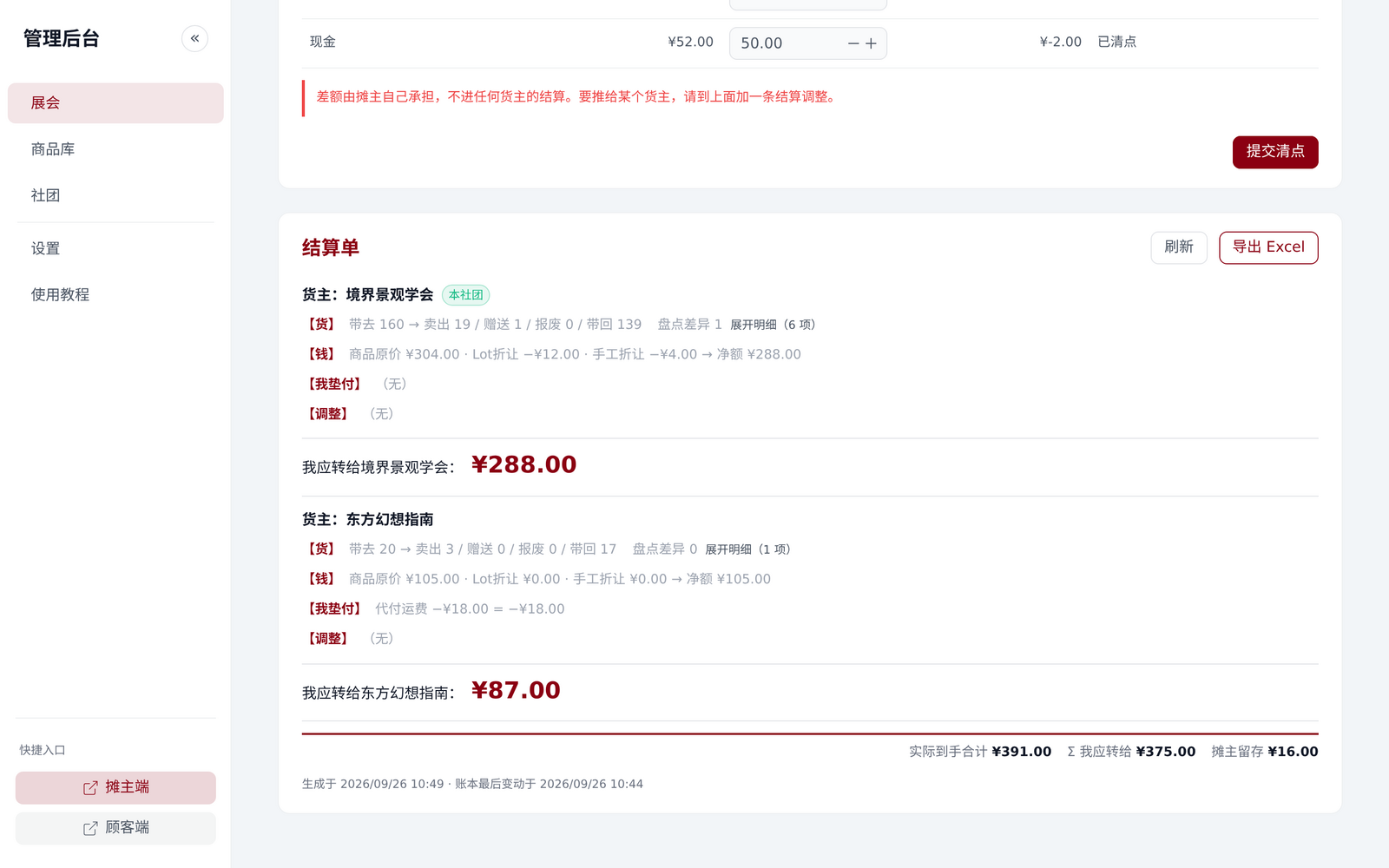
A settlement_<event name>.xlsx has four sheets:
| Sheet | What's in it | Which column a circle should look at |
|---|---|---|
| Settlement summary (「结算汇总」) | Per Owner: list price total, bundle discount, manual discount, net, refund retained, self-paid gifts, advances, adjustments, and finally I owe (「我应转给」); below that, each payment channel's book / actual / difference | I owe — the amount to transfer as calculated by the ledger. Advances and adjustments are listed item by item; if one looks odd, check it here |
| Owner details (「货主明细」) | Per Owner × product: brought / sold / gifted / scrapped / discrepancy / taken back / on-site stock, plus that row's list price / discount / net | Net (「净额」) — the actual sale value of that product (after bundle discounts and refunds); the circle's bookkeeper records this column |
| Ledger entries (「账本流水」) | Each journal's time, type, order number, summary, and its goods legs and money legs | Look here when you need "how was this money recorded"; one journal is one indivisible booking |
| Order details (「订单明细」) | Each line of each order: product, bundle, quantity, unit price, Owner's share, customer paid, quantity refunded | To check a specific order, look at Customer paid (「顾客实付」) and Quantity refunded (「已退件数」) |
⚠️ "I owe" on the settlement sheet does not mean "already transferred"
It's the amount the ledger says should be transferred. The system cannot verify any payment: it has no payment integration, and the "actual received" amount is counted and entered by the vendor. Keep your own receipts for transfers.
Also, the settlement sheet updates when you add things after freezing (advances / settlement adjustments / payment recount). Before exporting, check Last updated (「最后更新于」) in the header to make sure you have the latest one.
Product pack: .boothpack
Used to move the Product library when switching devices or running a booth with others, so you don't have to re-enter products one by one on the new device.
Where: on the Product library (「商品库」) page, scroll down to the Product data pack (.boothpack) (「商品数据包(.boothpack)」) panel:
- Export .boothpack: packs all current products' code, name, price, category, tags, commercial barcode, circle, plus preview images and AI recognition reference images, into one
.boothpackfile (it's really a zip archive). - Import .boothpack: drag a
.boothpackfile onto the panel, or click the import button and choose the file.
Typical uses:
- You entered all the products for this event on your own computer, and you'll use a tablet at the till on the day. Export, move the file to the tablet and import it; no retyping on the tablet.
- You're handing your Product library to a partner who will run the booth. Send them the
.boothpack; after importing, their product data matches yours.
Importing overwrites products with the same code
When importing a .boothpack, any product on the target device with the same product code is overwritten by the imported data. Export a copy of the current data as a backup before importing, to avoid overwriting by accident.
Legacy data (v1)
v1.2 uses a new ledger. Old events and orders were not migrated; they're kept as-is in the backup file sale_system.db.v1-backup.
Where: the notice that pops up the first time you log in to the admin console after upgrading; or any time in Settings → Legacy data (v1) (「设置 → 历史数据(v1)」) via Export old data to Excel (「导出旧数据为 Excel」). The export is legacy_v1_export.xlsx, with three sheets — Events, Orders, Order items (「展会」「订单」「订单明细」) — containing all old events and orders.
Devices without old data (fresh installs) don't show this section. See Upgrading from v1.1 to v1.2.